
Building Maestro, my admin menu editor, reminds me that hiding something is not the same as locking it. Maestro can hide a menu item from a role, but the page behind it is still there, guarded by its own capability check. A hidden menu item is like an “authorized personnel only” sign on a door that may or may not be locked, to which you may or may not have a key. The capability check is the lock. The sign can say “no admittance,” but whether that actually stops you depends on the status of the lock and key.
WordPress 7.1 gave the Abilities API a new flag called public, and it invites the same mistake from both directions. It’s easy to assume an ability without the flag is protected (i.e., not available to the public), and an ability with the flag is open to anyone. Neither is true.
The flag decides whether an ability can be seen and reached through a channel such as the REST API. It doesn’t decide whether a given caller is allowed to run it. Only the second question is about security. I wanted to be sure of that before writing it into the WordPress Security Benchmark, so I read the 7.1.3 code and ran it.
I checked the dev notes against the 7.1.3 code, WP-CLI, and the MCP Adapter: each channel has its own exposure rule, and one filter can let an anonymous request run an exposed ability.
What the flag does
You can now register an ability with 'meta' => array( 'public' => true ). It defaults to false. Think of it as a shared default that each channel can inherit. For REST, core resolves it exactly the way the dev note says:
$args['meta']['show_in_rest'] = $args['meta']['show_in_rest'] ?? $args['meta']['public'] ?? self::DEFAULT_SHOW_IN_REST;
So a public ability shows up under /wp-json/wp-abilities/v1/abilities unless show_in_rest says otherwise. The note says the MCP Adapter will honour the same flag “in its next release.” It already does: version 0.7.0, released October 2, inherits public unless meta.mcp.public is set.
What it doesn’t do
To its credit, the dev note is blunt about this. The flag “does not make an ability executable without authorisation,” it doesn’t replace the ability’s permission_callback, and nobody should treat public, show_in_rest, or any other exposure flag as a security boundary. Who may run an ability is decided by its permission_callback, plus anything that filters the result. More on that filtering below, because that’s where it gets interesting.
What I saw on a test site
I registered test abilities on throwaway WordPress 7.1.3 sites. Each one required manage_options and had a different combination of public, show_in_rest, and meta.mcp.public. Then I called them as an anonymous visitor, a Subscriber, and an Administrator. Over the core REST API, here’s what happened:
- You have to log in to see the list. The REST list and single-ability routes require the
readcapability. An anonymous request gets a 401. - The list isn’t filtered by permission. A Subscriber sees every REST-exposed ability, including the ones they can’t run. Trying to run one gets a 403.
- Not exposed means 404 over REST, for everyone. An ability without
publicorshow_in_restreturns 404 on the REST get and run routes, even for an Administrator. Knowing its name doesn’t help. - Not exposed doesn’t mean it can’t run. The same hidden ability ran normally when PHP called
execute()on it as an Administrator. show_in_restwins both ways.public => truewithshow_in_rest => falsestays hidden from REST.show_in_rest => truewithoutpublicis exposed.
Three doors, three exposure rules
REST is only one way in. I ran the same abilities through the WP-CLI wp ability command and MCP Adapter 0.7.0. Each one decides exposure for itself.
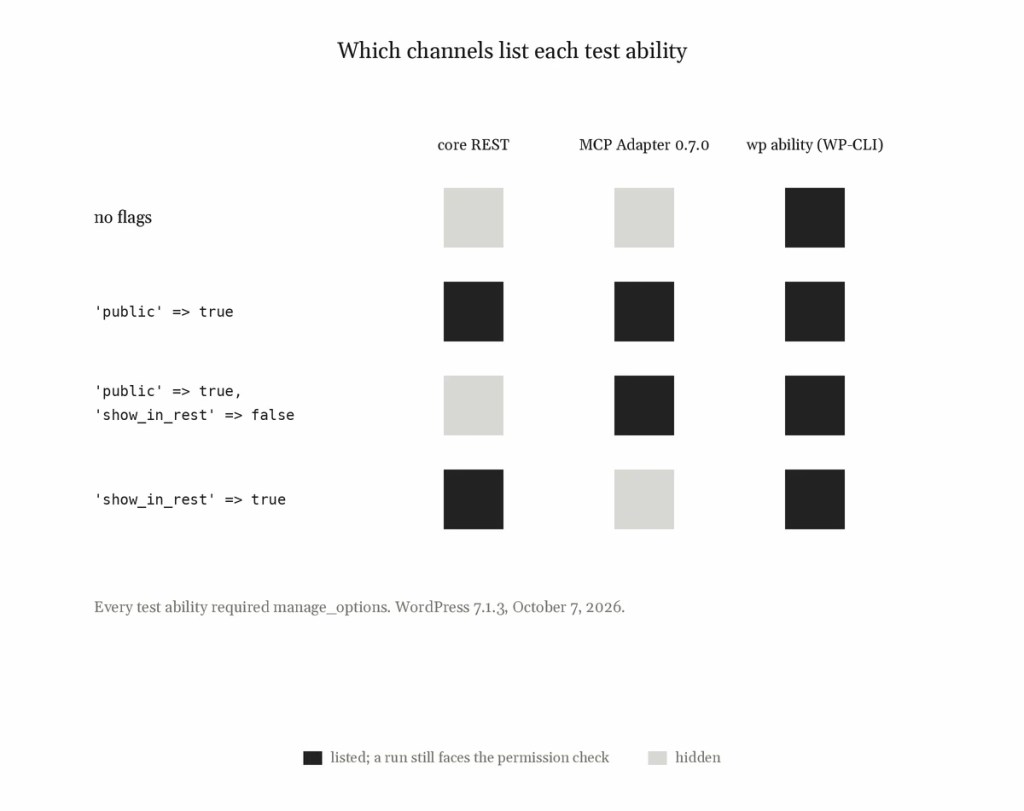
| Core REST | MCP Adapter 0.7.0 | wp ability | |
|---|---|---|---|
| Anonymous access | Cannot list (401); can attempt a run | None; the transport needs a logged-in user (401) | Runs as no user unless --user is given |
| Exposure rule | show_in_rest, else public | meta.mcp.public, else public; ignores show_in_rest | None; lists and runs everything registered |
| Hidden ability, as Administrator | 404 | “not exposed via MCP” | Runs |
| Exposed admin-only ability, as Subscriber | Listed; run returns 403 | Listed; run returns “Permission denied” | Run denied |
Two things are easy to miss. An ability with public => true and show_in_rest => false is hidden from REST but exposed to MCP clients, because the MCP Adapter doesn’t read show_in_rest. And WP-CLI has no exposure check at all, which the dev note says plainly: anyone with shell access can list every ability and run any that their --user is allowed to run.
Two ways to get it wrong
Treating “not public” as protection. Hiding an ability keeps it off the REST API and out of MCP. It’s still registered, and any PHP code on the site, or WP-CLI, can still run it. If its permission_callback is weak, because it returns true or only checks that someone is logged in, hiding it doesn’t make it safe. That’s the Maestro lesson again.
Treating “public” as “open to anyone.” A public ability can still require manage_options. Exposure only means logged-in clients can find it and callers can try to run it.
The filters around the permission check
The same release added execution lifecycle filters. In 7.1.3, WP_Ability::execute() runs in this order:
wp_ability_invoked(action)wp_pre_execute_ability- Input normalization, then
wp_ability_normalize_input - Input validation
- The permission check (
permission_callback), thenwp_ability_permission_result wp_before_execute_ability- The execute callback, then
wp_ability_execute_result - Output validation
wp_after_execute_ability
Two of these can change who gets to run an ability. They don’t behave the same way, and this is where the code and the dev notes part company.
wp_ability_permission_result can open an ability to anonymous visitors
This filter gets whatever the permission_callback returned, and it has the last word on every path. I hooked it to return true for my test abilities. An anonymous request to the REST run route for the exposed, admin-only ability then came back HTTP 200 with the ability’s output. Through MCP, a Subscriber could run it, but an anonymous client still couldn’t, because the MCP transport turns away unauthenticated requests before any ability is reached. Through WP-CLI it ran with no user at all.
The core docblock describes this filter as a way to layer extra rules on top of an ability’s own logic, and mentions “temporary permission elevation for trusted contexts.” Nothing stops a plugin from using it carelessly. The hidden ability still returned 404 over REST with the filter active, so exposure and permission really are separate switches.
wp_pre_execute_ability skips the check from PHP and WP-CLI, but not over REST or MCP
The dev note says that returning a value from this filter short-circuits everything after it, the permission check included. That’s true inside execute(). With the filter returning a result, a Subscriber calling execute() from PHP got that result for an admin-only ability. So did wp ability run, with no user and as a Subscriber, because the command calls execute() directly.
Over REST it’s different. The REST run route has its own permission callback, which normalizes and validates the input and calls check_permissions() before execute() is ever called. A denied request never reaches the filter. With the same filter active, anonymous and Subscriber REST requests still got 401 and 403. The MCP Adapter works the same way: it checks the ability’s permissions before running it, and a Subscriber still got “Permission denied.”
So the real authorization surface for an ability is its permission_callback, plus any code hooked to wp_ability_permission_result, plus, for WP-CLI and anything else that calls execute() directly, any code hooked to wp_pre_execute_ability. The exposure flag isn’t part of it.
wp_ability_invoked is not a complete audit log
The improvements note and the core docblock both say this action fires for every call, whatever the outcome. It fires at the top of execute(). Because the REST route and the MCP Adapter turn away denied requests before calling execute(), a denied attempt through either one never triggers it. A denied WP-CLI run does. So a log built on this hook misses exactly the remote attempts you’d most want to see. It also receives raw, unvalidated input, so logging from it can record secrets or personal data.
The core abilities
Core registers three abilities, all public and REST-exposed, and hooks none of the lifecycle filters itself. core/get-site-info and core/get-environment-info require manage_options; a Subscriber gets 403. core/get-user-info needs only a logged-in user and returns that user’s own ID, login, display name, nicename, roles, locale, first and last name, nickname, description, and URL.
What to check on your sites
- Search
wp-contentforwp_ability_permission_resultand read every callback that can returntrue. This is the one that can open an exposed ability to the public. - Search for
wp_pre_execute_abilitytoo, and for code that callsexecute()on abilities directly. - List every registered ability with its flags.
wp ability list --fields=name,public,show_in_restshows the ones REST hides. If the MCP Adapter is active, checkmeta.mcp.publicas well. - Make sure each exposed ability has a
permission_callbackthat checks a capability suited to what it does. - Check that nothing hooked to
wp_ability_invokedwrites raw input to a log, and don’t treat that log as complete.
These checks are now control 11.4 in the WordPress Security Benchmark:
11.4 Ensure Abilities API authorization overrides are reviewed
Profile Applicability: Level 2
Assessment Status: Manual
Description: Where the Abilities API is used (WordPress 6.9 and later; client-side integration from 7.0), code that can bypass or override an ability’s permission check must be inventoried and reviewed, and every ability exposed to external clients must enforce authorization in its own permission_callback.
Rationale: Abilities are named operations that AI agents, automation tools, and plugins can discover and run. WordPress 7.1 added execution lifecycle filters that any active plugin or theme can hook. Two of them change authorization outcomes.
wp_ability_permission_resultcan turn a denial from the ability’s ownpermission_callbackinto an allow on every execution path, including the REST API; a callback that returnstruelets even an unauthenticated request run a REST-exposed ability.wp_pre_execute_abilitycan return a result before input validation and the permission check run when code callsWP_Ability::execute()directly from PHP; it does not bypass the check on the core REST run endpoint, which validates input and checks permissions in its own permission callback beforeexecute()is called.
The same split holds for the other channels: WP-CLI’s wp ability run calls execute() directly, so the filter bypasses the check there, while the MCP Adapter (0.7.0) checks permissions before executing, so it does not. WordPress 7.1 also added a public metadata flag that controls whether an ability is exposed to external clients such as the REST API. That flag, like show_in_rest, controls discovery and exposure only; the core dev note states that exposure flags must not be treated as a security boundary.
- In WordPress 7.1.3, the REST list endpoints require a logged-in user with the
readcapability and show every REST-exposed ability to any such user, whether or not that user may run it; abilities that are not REST-exposed return 404 on the REST list and run endpoints but remain executable from PHP. Exposure is decided per channel. - The MCP Adapter (0.7.0) uses
meta.mcp.publicwhen set and otherwise inheritspublic, and ignoresshow_in_rest, so an ability hidden from REST withshow_in_rest => falsecan still be exposed to MCP clients. - WP-CLI (
wp ability listandwp ability run) applies no exposure check: it lists every registered ability and runs any of them, subject to the permission check for the--usergiven.
Impact: Requires a code inventory when plugins are added or updated. No runtime impact.
Audit:
This is a manual check.
- Find code that hooks the authorization-affecting filters:
$ grep -rnE "wp_pre_execute_ability|wp_ability_permission_result" /path/to/wordpress/wp-content/ --include="*.php"
Review each match. A callback on wp_ability_permission_result that can return true, or a callback on wp_pre_execute_ability that returns a result, must make its own equivalent authorization decision and have a documented reason.
- List the abilities exposed through the REST API, as an authenticated administrator (for example, with an application password belonging to a dedicated audit account):
$ curl -s -u audit-user:APPLICATION-PASSWORD https://example.com/wp-json/wp-abilities/v1/abilities
Where the wp ability command is installed (the wp-cli/ability-command package), list every registered ability with its exposure flags, including those hidden from REST:
# Plugin-dependent: requires the wp-cli/ability-command package.$ wp ability list --fields=name,public,show_in_rest
If the MCP Adapter plugin is active, also review abilities that set meta.mcp.public. For each exposed ability, confirm the registering code supplies a permission_callback that checks a capability appropriate to what the ability does. A callback that only returns true, or only checks that the user is logged in, is a finding unless the ability returns non-sensitive data.
- Confirm that logging attached to
wp_ability_invokeddoes not record raw input. The action fires before validation and receives unfiltered input, which may contain secrets or personal data. Do not rely on it as a complete record of denied attempts: it fires insideWP_Ability::execute(), which the REST run endpoint and the MCP Adapter never reach for a request they reject. Denied WP-CLI runs are recorded, because WP-CLI callsexecute()directly.
Remediation:
Remove or correct authorization overrides that are not justified. Add or tighten the permission_callback on each exposed ability. For abilities that should not be available to external clients, leave public unset (it defaults to false) and do not set show_in_rest. Give AI agents and automation tools a dedicated least-privilege account rather than an administrator’s credentials (see 11.3).
Default Value: Abilities are not exposed to external clients unless public or show_in_rest is set. WordPress core registers no callbacks on the lifecycle filters. The three core abilities are REST-exposed; core/get-site-info and core/get-environment-info require manage_options, and core/get-user-info is available to any logged-in user for their own account.
Behavior described in this control was verified on October 7, 2026 against WordPress 7.1.3 core code, the wp-cli/ability-command package (commit c6112cc), and MCP Adapter 0.7.0, on a test site.
References:
Still to recheck
WordPress 7.2 is scheduled for December 8, 2026, and I’ll recheck all of this then, along with whatever the MCP Adapter and the WP-CLI command have shipped by that point. Both are moving fast. The WP-CLI command I tested was committed the same day I tested it, and MCP Adapter 0.7.1 came out on October 16, after my testing, so the MCP results here are for 0.7.0 only.
How this article was researched & written
I started from the WordPress 7.1 developer notes, then checked every claim on October 7, 2026 against the 7.1.3 core code, the WP-CLI wp ability command, and MCP Adapter 0.7.0, on local test sites. Where the code and the notes disagree, this post follows the code and says so. WordPress 7.2 hadn’t been released when I checked, so its behaviour is still to be rechecked.
Method, for anyone repeating this: WordPress 7.1.3, reading wp-includes/abilities-api/class-wp-ability.php, wp-includes/abilities.php, and the three class-wp-rest-abilities-v1-*-controller.php files. Core REST requests were dispatched in-process through rest_do_request(). MCP Adapter 0.7.0 was the official release zip, driven over HTTP with JSON-RPC and application passwords. The WP-CLI command was wp-cli/ability-command at commit c6112cc, loaded with --require under WP-CLI’s Studio build.
I wrote this in dialogue with the code and docs through my AI tool of choice, Claude, which also helped with drafting, verification and copy editing.
The judgement calls, the framing, and the errors that remain are mine.
Leave a Reply