When I started working on the Keel Defaults plugin, I thought of it as a better way to enable and disable things that don’t have an admin interface setting in WordPress core — and to do this better (sometimes by doing more, sometimes less) than existing plugins that enable and disable “hidden” settings. In the process, I realized there are some significant things WordPress does — and more importantly, doesn’t do — that I didn’t know about or understand well, and they’re not widely known or well-documented, either.
One thing I was surprised to learn: Whether your site installs minor or major updates by itself — or if it installs them at all — is decided by when that instance of WordPress was first installed. I discovered this while unraveling the threads that emerged from a knot of questions around automatic updates and when, if, and how backported security patches might be applied to older sites through a new minor release for older branches.
Whether those security updates for older release version lines can still reach you is a question wp-admin does not ask and cannot answer, so most people won’t know — much as they won’t know their site’s birth date.
You can, of course, go and check these things by hand if you know about them and how to go about it — which I covered in the two blog posts I just linked to here.
But now Keel surfaces these missing settings, explains the situation for admins, and offers ways to initiate (automatically or manually) a minor update that’s a small hop to the last (secure) release in an old major version line. Check it out and tell me what you think about it.
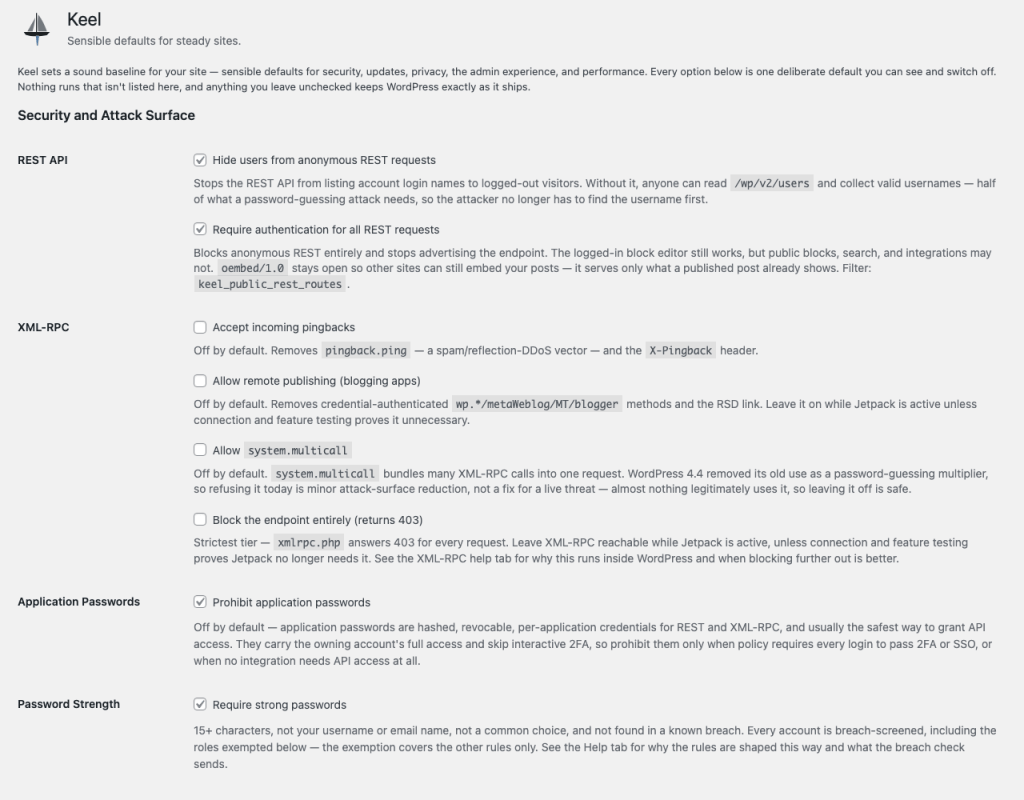
A few screenshots are worth a thousand words, but these screenshots actually contain a thousand words.
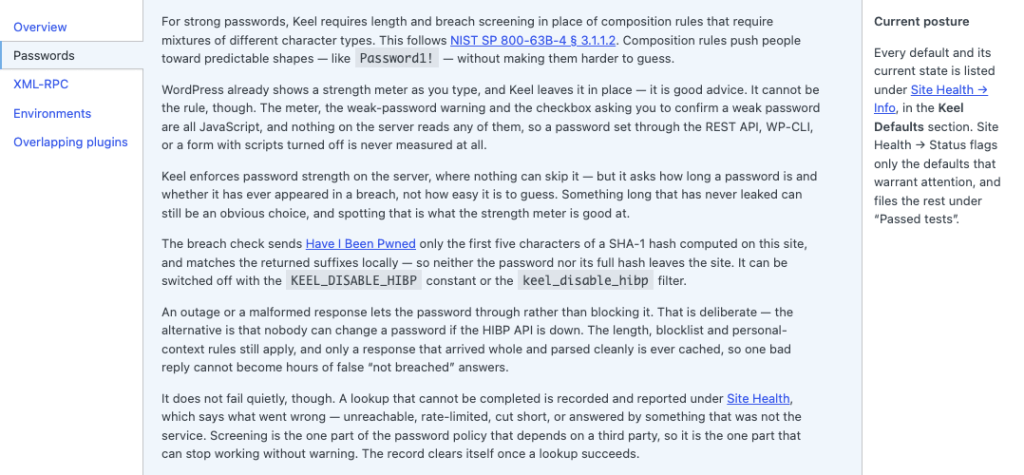
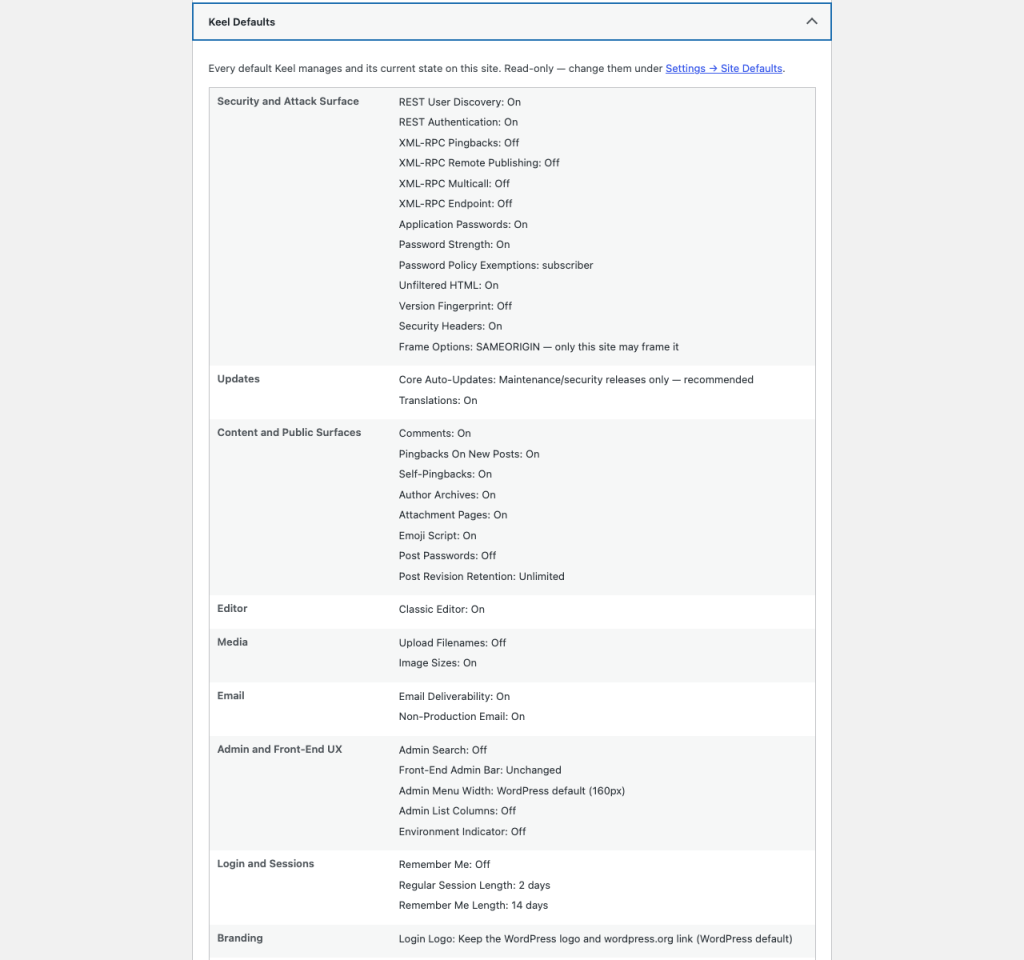
Thirty-nine switches, and no surprises
Keel adds 39 defaults to your WordPress site, each one a switch under Settings → Site Defaults, each with a clear description of its purpose and proper use. If you disagree with a default, you can change it there. Each one is further explained in standard dropdown help menus, auditable in Tools → Site Health, and if Keel sees something important, it says something — in notifications and/or the Site Health diagnostics.
New security patches for old sites
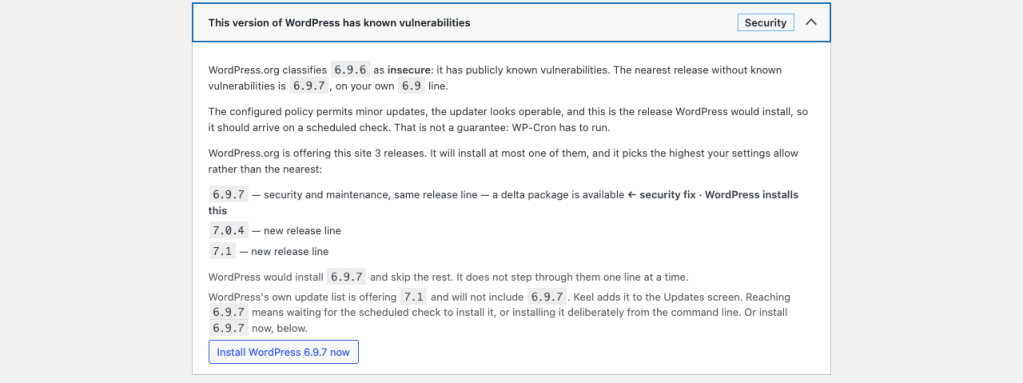
This is the newest feature for Keel. WordPress.org’s stable-check API tells you whether the mothership considers your site’s installed version of WordPress insecure, merely outdated, or the latest. Core itself never drops in to see what condition it’s condition is in. Keel does, and it reports the answer in Site Health.

More usefully, when a patched release exists on your own line, Keel names that release rather than the newest one. A 6.9.5 site is told about 6.9.7, not 7.1 — only the third number moves, so nothing is deprecated out from under it. It also shows the ladder of releases WordPress.org is currently offering, and it marks the one WordPress would actually install, which is the highest your settings permit rather than the nearest. That gap is the whole subject of “Your WordPress site’s age decides whether it installs major updates.”
Then an administrator can install the same-line patch deliberately, through WordPress’s own upgrader. Nothing installs unless they click the button.
In addition to that, Keel tells you what your core auto-update policy actually is and what’s determining it. If it’s not something overridden by your host or config.php, Keel gives you a default setting in the admin interface to set your update policy: accept or block major, minor, and translation pack updates. Then there are 38 other settings Keel gives you. Some are UX conveniences; most harden your site’s security and improve its performance.
Disabling something means it is actually disabled
This is the claim I care most about, because something marked “disabled” that actually is buried or hidden (“not rendered”) is precisely the failure mode Bad Sector is named after.
When you switch comments off in Keel, they are off below the presentation layer — not merely hidden by the theme template and the REST route. Ask the database directly, and there is nothing to hand back:
get_comments( array( 'post_id' => 42 ) ); // array()
Disabling comments also stops the comment feed from answering requests.
The same care runs through the rest of Keel’s settings. Closing the REST API also removes the link element advertising it, and so on.
A protective posture that is documented but does not actually work is worse than not having it but knowing that is the case.
The whole posture on one screen
Keel gives Site Health a read-only panel listing every default and its current state, so you can answer “what is this plugin doing to my site?” without opening the settings and reading checkboxes. It also reports when another plugin is controlling the same setting — a conflict that otherwise resolves silently, in favour of whichever loaded last.
Mail stops at the edge of production
An unsanitised database pulled down from production carries real customer addresses and whatever mail service production was using. A cron run or a bulk action on your laptop can then email real people — not good! Keel suppresses outgoing mail on any environment that is not production, by default. It does nothing on production. And it says so in an admin notice, so nobody is left wondering why a password reset never arrived.
What Keel sends, and where
Two outbound services, both optional, both documented in the readme.
- With strong passwords enabled, Keel screens new passwords against the Have I Been Pwned range API using k-anonymity: the first five characters of the password’s SHA-1 hash, never the password and never the full hash. Disable it with
define( 'KEEL_DISABLE_HIBP', true );if you would rather not. - Keel’s version check asks WordPress.org’s stable-check API — the same host core already contacts for updates and translations.
Both fail open. If the service is unreachable, the check is skipped rather than blocking you. But it is not skipped silently: the failure is recorded and surfaced in Site Health, so a site whose screening has quietly stopped working can say so. A check that cannot report its own failure is not a good check.
Keel has been reviewed, and it needed it
Austin Ginder of Anchor Hosting reviewed Keel 0.6.0 and reported six issues. None were critical, and none were a hole the plugin opens. Two, though, were documented protections that were not taking effect at all.
Core registers redirect_canonical on template_redirect at priority 10 during load, before any plugin file is read. Two of Keel’s redirects registered at the same priority and therefore lost the tie on registration order — every time, invisibly. And comments_pre_query covers every comment listing path except /wp/v2/comments/123, which reads its row without building a query, so a site with comments disabled still answered on that one route.
Both are fixed. More to the point, the test suite now checks that a registration actually wins its hook rather than merely existing, because the old tests could not have caught either one. That is the useful shape of a good review: not the bugs, but the category of bug you were not testing for. Thanks, Austin.
What it does not do
Keel is not a firewall, a malware scanner, or a login-attempt limiter. It does not watch traffic. It sets defaults, tells you the truth about their state, and gets out of the way. If you want a WAF, buy a WAF.
Get it
Keel Defaults on WordPress.org — or search “Keel Defaults” from Plugins → Add New. Source and issue tracker: github.com/dknauss/Keel.
Requires WordPress 6.4 or later and PHP 7.4 or later. GPL-2.0-or-later, free, and staying that way.
Co-Authored with Claude
Keel and this post about it — in fact, this entire blog — are the product of collaboration with LLMs, mainly Claude. I mainly used Opus 5 for drafts, research, and copy editing. Same for the plugin and its test suite.
Every behavioural claim here about Keel is one Keel’s own tests assert, or one I have reproduced on a live site. The security review described in this post was real, unsolicited, and unpaid; the findings and their fixes are in the public commit history.
The judgement calls, the framing, and the errors that remain are mine.
Leave a Reply