
My last post in this series, Is your old WordPress site still getting security updates?, ended with a table. It illustrates the possible core auto-update outcomes for one WordPress 6.8.7 site that’s flagged insecure, with its two core update options set four different ways. With minor updates on and majors off, it installed the backport and landed on 6.8.8. With both on, it skipped the backport entirely and jumped to 7.1. With both off, it stayed where it was and remained vulnerable.
I said that table came from a real site driven against the live WordPress.org API, with the options changed one at a time. That is true, and it raises a fair question: how?
Security releases arrive when they arrive. Some years there are a handful. Then there was this autumn: I finished the first draft of this post on September 16, and WordPress shipped security releases on September 17, September 22 and October 6, each one backported down to the 4.7 branch. Three in under three weeks. Nobody outside the security team could have put those dates on a calendar, and you can’t sit around waiting for the next one.
The problem with waiting
Suppose you want to answer a simple question about a site you maintain: if a security patch for this version shipped tonight, would it install?
You can’t test that by waiting, for four separate reasons.
The event is unscheduled. Backports arrive when the security team has them ready. There is no calendar, and as the last few weeks showed, there is no reliable rhythm either.
Between releases there is no backport to watch. Ask WordPress.org what it has for a site on the current release and you get one offer, latest, and nothing flagged for automatic installation. Ask on behalf of an older branch’s patched tip, say 6.4.13, and you do get autoupdate offers, seven of them, but every one is a different branch: 7.1.3, 7.0.7 and so on down to 6.5.13. A site on the default minor-only policy turns all of them down, correctly. You can watch it refuse. What you can’t watch, until the next release lands, is the one decision you care about: a same-branch patch being accepted.
Local sites never check. Core’s update check rides wp-cron, and wp-cron fires on page loads. A development site with no traffic will sit there indefinitely without ever asking the question.
A null result proves nothing. This is the one that matters. If you wait a month and nothing installs, you have learned nothing at all. Maybe the settings are right and nothing was offered. Maybe the settings are wrong. Maybe there is a stray .git directory two levels up refusing every update silently. “Nothing happened” is indistinguishable from “everything is broken.”
So don’t wait. Make the decision happen on demand.
tl;dr
- The update pipeline can be controlled and driven deliberately by substituting one field in the WordPress.org version-check response — the
responseflag that says whether an offer isautoupdateorupgrade. - Leave the package URLs pointing at the real
downloads.wordpress.orgarchives. Then you will get a genuine WordPress release, through core’s own upgrader, and you are testing WordPress actual rather than testing your mock. - Check that the site is capable of updating before you conclude anything. Two common blockers — a repository directory at the site root, and an updater that cannot download — produce failures that look exactly like the feature not working.
- Anything that lies to the update system must refuse to run where it matters. On a real site, a faked offer can set off a core update nobody scheduled, or hide a security patch the site needs, so the harness won’t load unless it’s switched on deliberately and the site isn’t marked as production.
- If your test site uses SQLite, stop it before writing to it from WP-CLI. Otherwise the web server and WP-CLI can end up writing the same database file at once, which can corrupt it in a way that stays invisible until an unrelated query fails days later. (Guess how I learned that…)
Fake as little as you possibly can
The whole harness is one pre_http_request filter. It watches for requests to api.wordpress.org/core/version-check, and for those requests only, it returns a response it built itself:
function intercept_version_check( $preempt, $parsed_args, $url ) { if ( false === strpos( $url, 'api.wordpress.org/core/version-check' ) ) { return $preempt; } ...}
Everything else about the request goes through untouched. And within the substituted response, almost everything is real. The offer’s download and packages['full'] point at https://downloads.wordpress.org/release/wordpress-6.4.13.zip — the actual archive, the same one your site would have fetched on its own.
That distinction is the entire design. The synthetic part is one flag: whether this offer is labelled autoupdate or upgrade. Everything downstream of that flag is WordPress doing what WordPress does. WP_Automatic_Updater::should_update() runs for real. find_core_auto_update() walks the offers for real. The upgrader downloads a real zip, verifies it, and installs it.
None of this is a new trick. Filtering pre_http_request is the ordinary, documented way to fake an HTTP response in WordPress, it is what the testing write-ups reach for, and 10up/wp_mock exists for the general case. If you have written tests against anything that talks to an API, you have done this.
What I have not seen done is the restraint. The standard use is unit-test shaped: mock the response, assert on a return value, install nothing. That answers a question about your code. It cannot answer a question about WordPress, because in a unit test WordPress never gets as far as deciding anything.
The temptation, when you want to test an updater, is to mock the updater. Don’t. A mocked updater tells you your mock works. If the seam is one flag wide and sits at the outermost edge of the system, everything you observe past it is evidence — and the further in you move that seam, the more of the answer you have written yourself.
It lies to the update system, so it refuses to load
A plugin that feeds WordPress false update offers has no business anywhere near a real site. So it declines to run unless two independent conditions hold:
function is_permitted() { if ( ! defined( 'WP_UPDATE_LAB' ) || ! WP_UPDATE_LAB ) { return false; } if ( function_exists( 'wp_get_environment_type' ) && 'production' === wp_get_environment_type() ) { return false; } return true;}
Two gates, not one — a deliberate choice. A constant in wp-config.php is an explicit opt-in, but constants travel — someone clones a staging site to production and the opt-in rides along in the config file. Environment type catches that, but environment type is also frequently unset or wrong. Either alone is a single point of failure. Together they mean the harness has to be both deliberately switched on and not looking at production.
Never put anything like this on a real, live site.
Watch the decision, not just the outcome
Knowing that a site did or didn’t update is the least interesting thing you can learn. What you want is which gate decided, because that is what you would have to change.
Core makes the call through a short series of filters. The harness attaches an observer to each one:
$gates = array( 'allow_dev_auto_core_updates', 'allow_minor_auto_core_updates', 'allow_major_auto_core_updates', 'auto_update_core', 'auto_update_translation', 'async_update_translation',);
Each observer runs at PHP_INT_MAX - 1, logs the value it was handed, and returns that value unchanged. Late enough to see the final answer after every other filter has had its say; passive enough that watching cannot alter what it watches.
Those, plus pre_auto_update and automatic_updates_complete, append JSON lines to wp-content/update-lab.log: the offer that went in, what each gate returned, and what happened. In the backports post I quoted the lines of core that pick the highest permitted offer rather than the nearest one. With the log you don’t have to take my word for it — you can watch it choose.
doctor, or: the failures that look like success
This is the part I would keep if I had to throw the rest away.
Two conditions will make a correctly configured site fail to update, and both of them produce evidence that reads as “automatic updates don’t work.”
A repository directory at the site root. is_vcs_checkout() finds a .git, .svn, .hg or .bzr directory and refuses every automatic update. I covered this as a footgun in the backports post. As a testing problem it is worse, because the site under test is very often a checkout — that is why it exists. You will arm a scenario, run it, watch nothing install, and conclude something false about WordPress.
An updater that cannot download. This one is genuinely nasty. Every decision gate still passes. The offer is accepted, the update is attempted, and the download fails at the end. Nothing upstream reports a problem, because nothing upstream had one.
So the harness has a doctor command, and doctor‘s job is to distrust the harness. It reports the core version and its stable-check status, the patched tip of the branch, and every option and constant that governs the outcome. Then it does the part that matters: it runs a real download_url() against a small language pack.
Not a wp_remote_get() to check connectivity. The actual download_url() path a core update takes, through WP_Http, including redirect validation. A connectivity check that takes a different route through the stack is a connectivity check that can pass while the real path fails.
That is not a hypothetical distinction, and I wrote about the same shape of bug in the backports post: Site Health’s “Communication with WordPress.org” test issues a GET to the API root, while the update check POSTs to /core/version-check/1.7/. A failure specific to the method, the path, a proxy or a cache passes Site Health and breaks updates anyway. Same lesson, one layer down. If your self-test doesn’t walk the real path, it isn’t a self-test.
The scenarios
| Scenario | Offer | Demonstrates |
|---|---|---|
backport | patched tip, autoupdate | Backports ride the minor channel |
backport-blocked | patched tip, autoupdate | Disabling minors disables security patches |
major-autoupdate | latest, autoupdate | auto_update_core_major decides |
major-upgrade-only | latest, upgrade | find_core_auto_update() skips it regardless of the option |
translations | language pack, autoupdate: true | Installs with no local option consulted |
off | none | Passthrough to the real API |
major-upgrade-only is the one I would ask you to run, against every value of auto_update_core_major you can think of. It never installs. That is the point: an offer flagged upgrade is skipped by find_core_auto_update() no matter what your options say. Turning major auto-updates on is necessary for a major auto-update and it is not sufficient, and no amount of reading the documentation will give you that distinction as firmly as watching it refuse six times in a row.
Watch a backport install
Pin a site to 6.4.9 — which WordPress.org currently classifies as insecure — and drive it forward:
S=/path/to/site./update-lab.sh --path=$S pin 6.4.9./update-lab.sh --path=$S doctor./update-lab.sh --path=$S scenario backport./update-lab.sh --path=$S run./update-lab.sh --path=$S log
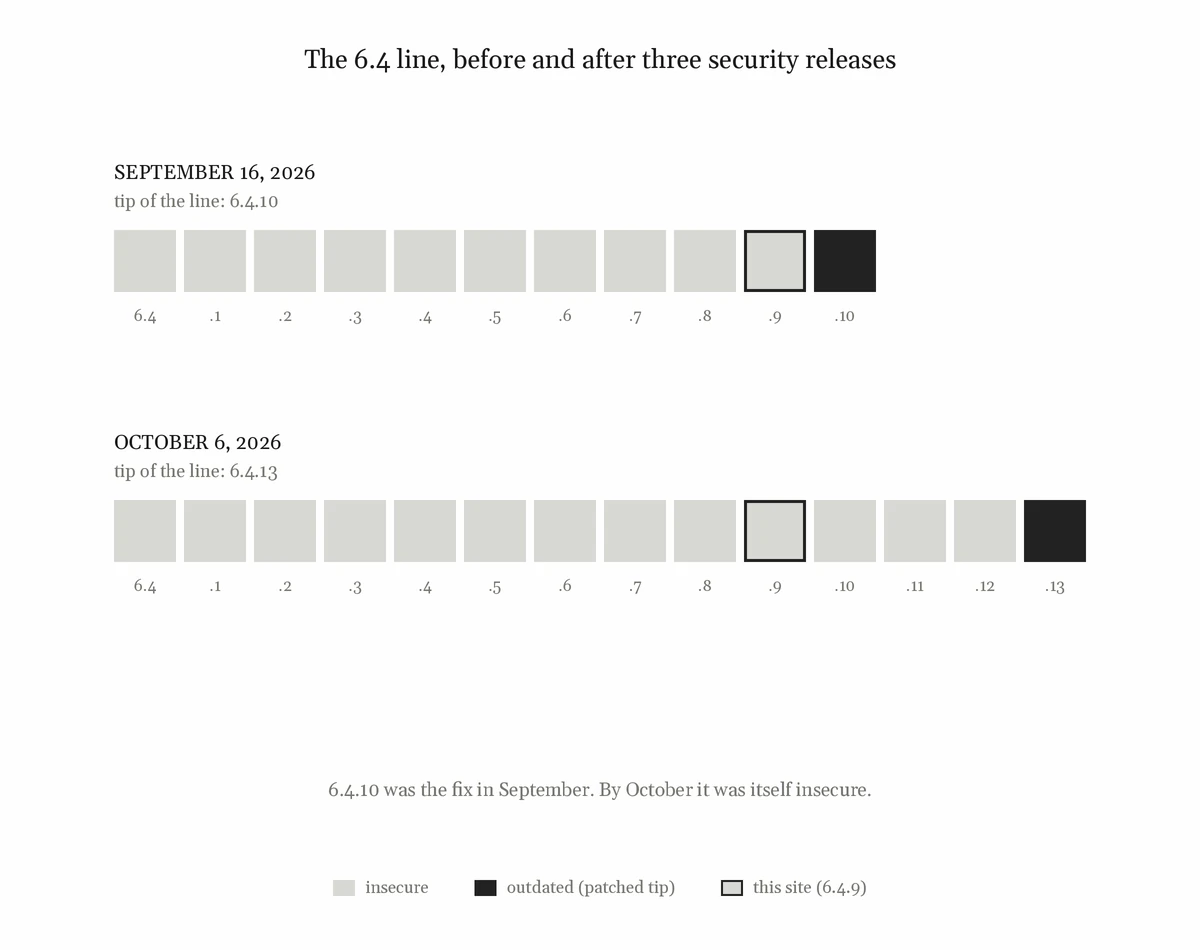
The backport scenario offers whatever the branch’s patched tip is on the day you run it; the script asks WordPress.org rather than hard-coding it. When I first ran this, the patched tip was 6.4.10. As I write this, three security releases later, it is 6.4.13, and 6.4.10 is itself listed as insecure. That’s the whole problem in miniature: last month’s fix is this month’s vulnerable version.
I re-ran this on October 6, the day 7.1.3 shipped, on a fresh 6.4.9 install with major updates switched off. The site moved from 6.4.9 to 6.4.13, insecure to outdated. It took that route because both are on the 6.4 branch, so the decision ran through allow_minor_auto_core_updates, the ordinary minor-update channel, exactly as I described in the backports post.
That run didn’t even need the substituted offer. A site that’s behind its branch’s patched tip is offered the patch for real, so the live API was enough; the harness earns its keep on a site already on its patched tip, waiting for a patch that hasn’t shipped yet. Here is the decision as a passive observer on the same gates logged it, with timestamps removed and the identical refusals for 7.0.7 through 6.5.13 cut:
{"event":"gate","gate":"allow_major_auto_core_updates","value":false}{"event":"gate","gate":"auto_update_core","value":false,"offer":"7.1.3"}…{"event":"gate","gate":"allow_minor_auto_core_updates","value":true}{"event":"gate","gate":"auto_update_core","value":true,"offer":"6.4.13"}{"event":"complete","core":[{"item":"6.4.13","result":"6.4.13"}]}
A 6.4.9 site asking WordPress.org today is offered nine releases: 7.1.3 twice (once as upgrade, once as autoupdate), then autoupdate entries stepping down through 7.0.7, 6.9.10, 6.8.11, 6.7.10, 6.6.10, 6.5.13, and finally 6.4.13 at the bottom. The bottom rung is the one that keeps a 6.4 site on 6.4.
Now run the same offer into a site that has switched minor updates off:
./update-lab.sh --path=$S pin 6.4.9./update-lab.sh --path=$S scenario backport-blocked./update-lab.sh --path=$S run
Identical offer. auto_update_core_minor set to disabled. No install. The site stays on 6.4.9 and stays insecure. In the October 6 run, the one line that differed from the first site’s log was {"gate":"allow_minor_auto_core_updates","value":false}.
That is the both-off row of the table in the backports post, and this is the difference between asserting it and demonstrating it. The log line names the gate that said no.
Two ways my test environment lied back
A sandboxed shell breaks the download, and blames the wrong thing. If you drive this from an agent or CI harness that sandboxes commands, the install dies with:
download_failed :: A valid URL was not provided.
That message is wrong twice over. It is not about the package URL — it comes from WP_Http::validate_redirects(), because a sandbox HTTP proxy redirects to a host that wp_http_validate_url() rejects. And it is frequently reported from the rollback attempt rather than the original failure, because the automatic updater passes attempt_rollback => true, finds no rollback package, and fails a second time on an empty URL. You are reading the error from the cleanup, not the error from the thing that broke. doctor, pin, scenario and log all run fine sandboxed. Only run needs a direct connection to downloads.wordpress.org, and doctor‘s preflight will tell you whether you have one before you spend a scenario finding out.
I corrupted a SQLite database by not stopping the site first. A SQLite site, via the sqlite-database-integration drop-in, is enough for this entire matrix — nothing here needs a web server, because every step runs through WP-CLI. It is the cheapest possible test environment.
It is also two processes writing one file, if the site happens to be serving requests at the same time. WordPress Studio keeps each site’s server running; WP-CLI reaches the same database file by a different route. A single wp language core install against a live site was enough to damage the B-tree, the structure SQLite uses to keep each table in order.
Here is what made it costly: nothing looked wrong. The site kept serving. Posts read back fine. The damage surfaced later, from an unrelated query against wp_options:
SQLSTATE[HY000]: General error: 11 database disk image is malformed
If you suspect a site, ask it:
sqlite3 wp-content/database/.ht.sqlite "PRAGMA integrity_check;"
Anything other than ok means damage. Recovery is usually complete — stop the site, back up the file, .recover into a new database, check integrity, compare row counts before you swap it in, and delete the stale -wal and -shm files alongside it. In my case every post, postmeta and option row survived except one update transient, which WordPress regenerates by itself.
This applies to any WP-CLI write against a running Studio site. It is not specific to this harness. It is the reason doctor is safe to run at any time and run is not.
A warning is a defect you decided to live with
The harness’s commit history is four commits long, and two of them are about that SQLite problem.
The first added a warning to the README. The second made the tool refuse to write to a SQLite site that is still serving, with --force as the deliberate escape hatch for anyone certain that nothing else is writing.
I think the gap between those two commits is the most useful thing in the repository. Writing the warning required knowing the exact condition — SQLite in use, site responding on its own URL — and being able to detect it. Which means that by the time I had written the warning, I already had everything I needed to stop the thing from happening. I just hadn’t decided that was my job yet.
If your tool knows enough to warn, it knows enough to refuse.
What this is for
Not a test suite. Not CI. Not something to install anywhere that matters, for reasons covered above at some length.
It is an instrument for producing evidence. The difference between “WordPress should install the backport” and “I watched WordPress install the backport, and here is the log line where it decided to” is the difference between a claim and a finding — and on a subject where most of the available writing is confident, secondhand, and about a quarter wrong, that difference is worth the afternoon it costs to build.
If you maintain sites for other people, the question this answers is the one you should be able to answer: not “are auto-updates enabled?” but “when the patch comes, what does this site actually do?”
I’m not publishing the harness. It works by telling a site lies about its updates, and the safest number of easily distributed copies of a tool like that is zero. Everything that makes it work is in this post anyway: one filter, two gates, a passive observer on the decision, and a self-test that walks the real download path. If you build your own, build the gates first.
The other end of the same problem
The lab answers this question on a throwaway site by making the decision happen. On a real site you want the opposite: not to trigger the decision, but to find out where you stand right now, and to act on it.
That is what Keel does. WordPress.org publishes the status of every release at its stable-check endpoint, and core never asks — so nothing in wp-admin distinguishes “an update is available” from “this version has known vulnerabilities.” Keel asks, reports which of the three states your exact version is in, and where a same-line patch exists, names that release rather than the newest one and lets an administrator install it through WordPress’s own upgrader.
It has to add that offer back by hand, because get_core_updates() — the function the Updates screen is built from — discards every offer flagged for automatic installation; it’s the first thing in the loop (if ( 'autoupdate' === $update->response ) { continue; }, still there in 7.1.3). A same-line security patch is only ever offered that way. Ask the live API on behalf of a 6.9.6 site today and you get four offers: 7.1.3 as upgrade, then 7.1.3, 7.0.7 and 6.9.10 as autoupdate. Run those through that loop and one survives: 7.1.3. When I tested this against a real site in September, get_core_updates() returned the newest release twice and nothing else. Either way, that screen has never shown you the patch.
While looking for prior art on all this, I found wp-auto-updater, a maintained plugin on WordPress.org that schedules core updates and offers five different core update policies. Its settings screen shows you the newer WordPress version available. It gets that number like this:
$updates = get_core_updates();if ( isset( $updates[0]->response ) ) { echo esc_html( $updates[0]->version );}
Which means it cannot ever show a same-line security patch. get_core_updates() dropped it before the plugin saw it, and what gets displayed is the newest release — the thing the site’s own Updates screen was already showing.
This is a plugin about core updates, written by someone who plainly knows the update system: it handles multisite, it has a larger test suite than most plugins its size, and it reasons carefully enough about version arithmetic to leave a comment linking the floating-point guide. That is the point. This is not a careless mistake. It is what a well-hidden trap looks like from the outside — you call the obvious function, the one the Updates screen itself is built from, and it quietly hands you an incomplete list.
If a function’s name is get_core_updates() and it returns only some of the core updates, the confusion and surprise is not on the caller.
Part of this series
- Your WordPress site’s age decides whether it installs major updates — where core’s auto-update defaults come from, and how to read your site’s real policy.
- Is your old WordPress site still getting security updates? — how a security fix reaches an older site, and what silently stops it.
- Keel Defaults — the plugin that makes both visible and settable.
- Who actually gets WordPress security backports? — how many real sites take the backports, and how fast.
- You can’t observe a security backport by waiting for one (this post) — the harness behind the tables in posts 1 and 2.
Verified against WordPress 7.1.3, Keel 0.6.7, and the WordPress.org stable-check and version-check APIs on October 6, 2026. On that date stable-check listed 959 releases: one latest (7.1.3), 24 outdated, and 934 insecure. On September 16, when this post was first drafted, it listed 884, and 859 of them were insecure. Three security releases account for the difference.
How this article was researched & written
The harness in this post exists because I didn’t trust my own earlier draft of the last one. I had written down how WordPress would behave on an older branch, and I realized I couldn’t show it. The tables in that post are this harness’s output, and this post is the account of how they were produced.
Every scenario described here was run, and the version numbers and API responses are recorded output, re-derived on the verification date rather than carried over. The October 6 re-run used a passive observer on the same gates, on fresh installs, with nothing substituted, because the live API was offering the patch on its own. That re-derivation earned its keep: three security releases landed between the first draft and this one, and one claim in the draft — that a site on its patched tip is offered nothing to auto-install — turned out to be true only for the current release. Where a statement rests on reading core’s code rather than running it, the text says so. The SQLite corruption was real and was mine, and the recovery steps are the ones I ran. The sandbox failure was diagnosed by reading core, not by trusting the error message, which is wrong about both its cause and its origin.
I wrote this, as I do the rest of this blog, in dialogue with the code, the APIs and live test sites through my AI tool of choice, Claude, which also helped with drafting, follow-up research, verification and copy editing. The wp-auto-updater passage was read in that plugin’s source at version 1.7.4, not inferred from its readme, and a separate defect found in the same read was reported to its author before this post was written.
The judgement calls, the framing, and the errors that remain are mine.
Leave a Reply