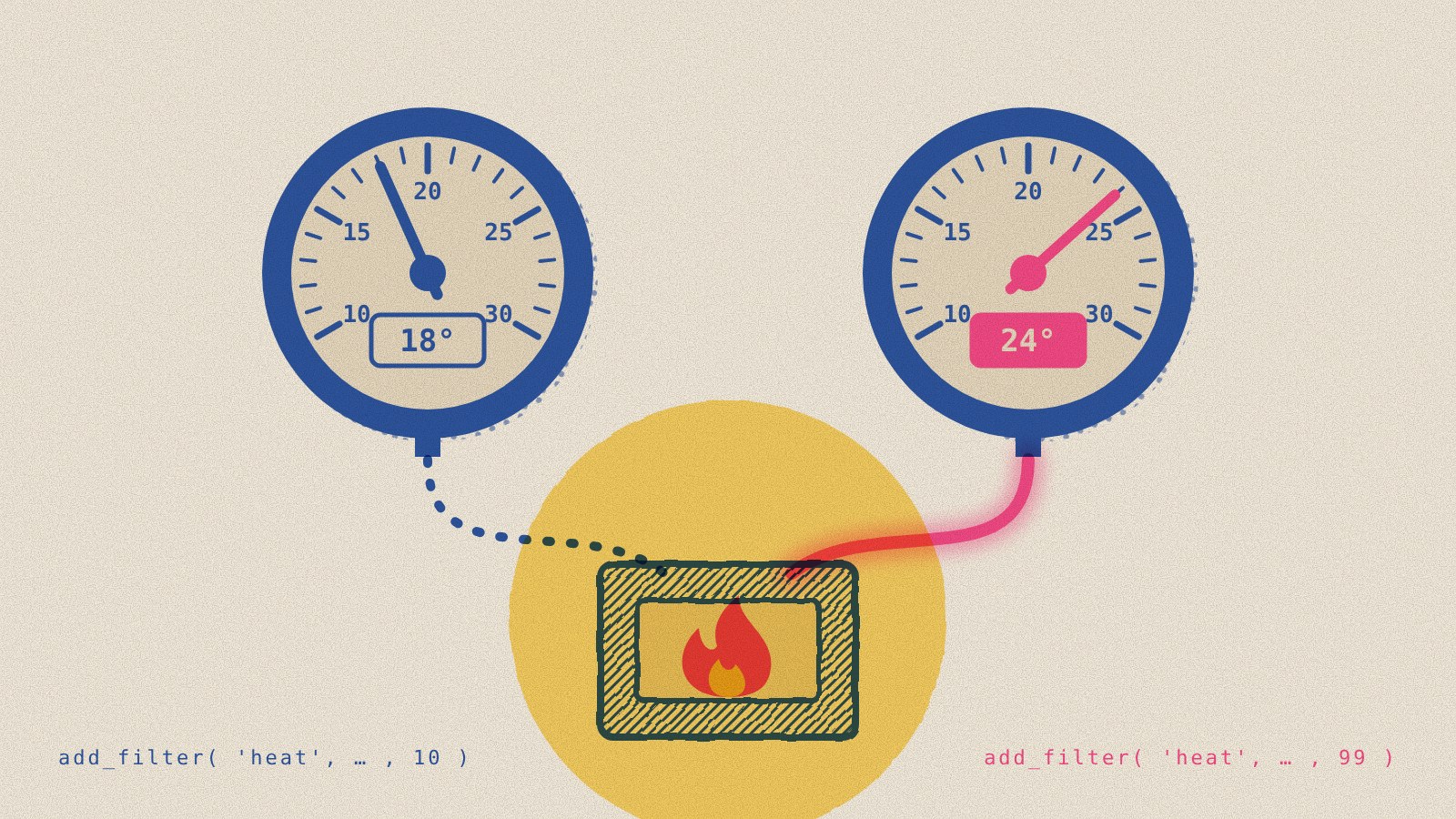
Picture two thermostats wired to the same furnace. Each one shows the temperature you set on it. Only one of them is actually in control, and neither display tells you which one that is! That’s roughly how WordPress settings work once more than one plugin, theme code, or snippet is acting on them.
Most WordPress policy runs through filters. A plugin adds a callback to a hook such as comments_open or auto_update_core, WordPress runs every callback in priority order, and the last value standing is the answer. Nothing errors, and nothing is logged. A settings screen can say comments are off, or that core updates are limited to security releases, while something else on the site has quietly decided otherwise.
Recent work I’ve been doing on Keel closes that gap in two places where it matters most: core updates, and settings that other plugins also touch. This post covers what Keel now shows on the Updates screen and in Site Health, how its conflict diagnostics work, and what I got wrong and learned along the way.
What the Updates screen says now
WordPress’s own Updates screen tells you the version you’re running and whether a newer one exists. Since WordPress 5.6 it has also said whether core updates itself with maintenance and security releases only, or with every release. It doesn’t tell you who decided that, whether that decision covers plugins and themes, or whether the setting you chose is the one actually in force.
Keel now adds a short notice above Current version, ahead of core’s own automatic-update line. Core’s wording is left exactly as it is. The notice Keel adds has four lines:
- WordPress: The core policy in plain language, like “Maintenance and security releases only, not major upgrades.” or “Automatic core updates are off.”
- Plugins and Themes: A plain summary of whether Keel turns auto-updates on or off for both, or if it leaves each one to its own toggle. When it’s the per-item toggles, the line links to them and says how many items WordPress has no update data for yet.
- Translations: On or off.
Each label links to the setting that controls it, for people allowed to change it. On multisite, a policy set by the network links to the Network Policy screen instead, and only Super Admins get that link.
Under the list, one line names the release branch the site is on and the source of the policy. That might be Keel’s Site Defaults, Keel’s network policy, WP_AUTO_UPDATE_CORE in wp-config.php, or a constant that turns background updates off altogether. The notice ends with a caveat every site admin needs to keep in mind: “An update policy describes but does not guarantee the intended outcome. Cron, hosting restrictions, and other plugins can affect update delivery.”
When the policy and reality disagree
The line that does the most work only appears when something is wrong. WordPress hands the hook Keel uses its already-filtered automatic-update settings. Keel compares those with the policy it was asked to apply. If they differ, the notice says so: “Core’s current filtered settings differ from the configured policy. Other components or updater restrictions may be affecting it.”
Keel doesn’t re-run anyone’s filters to get that answer. It reads the result WordPress already produced. That matters, as I’ll explain below, because running other plugins’ callbacks to see what they do is a good way to cause the very problem you’re trying to report.

The forensics live in Site Health
The notice links to View update diagnostics, which opens a Keel check in Site Health. I moved the detail there in #322 because it’s troubleshooting material, not something everyone who visits the Updates screen needs. The check opens with a plain disclaimer: these tables “do not provide a health verdict or an installation schedule.”
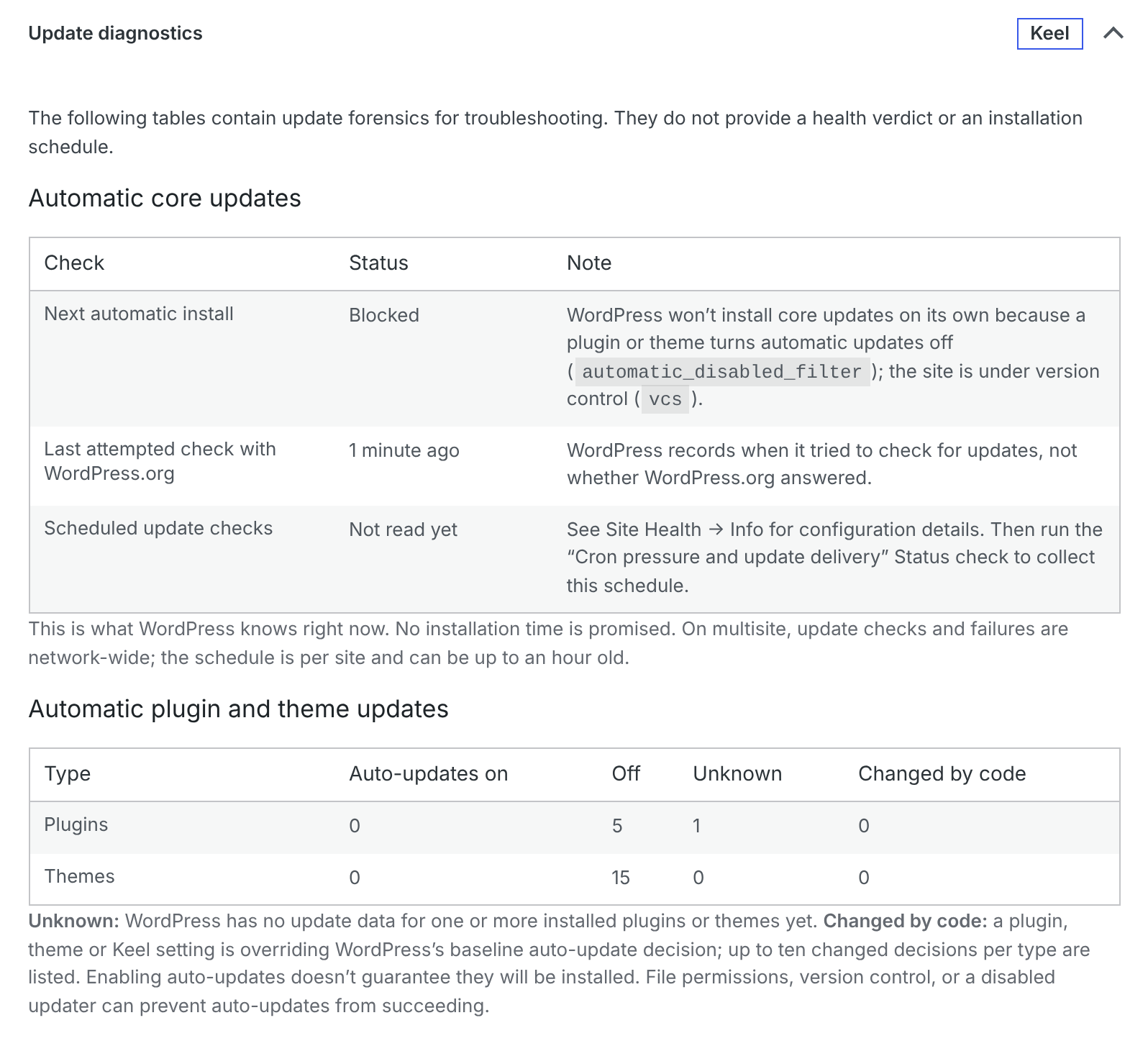
The first table, Automatic core updates, answers the questions I kept asking while watching backports arrive:
| Row | What it tells you |
|---|---|
| Next automatic install | The release WordPress will try on its next run, “No update queued”, or Blocked, with every reason WordPress gave |
| Newer patch for this branch | The latest security release on the site’s own branch, when there is one |
| Last attempted check with WordPress.org | How long ago WordPress tried to check, flagged as stale after a day |
| Next scheduled update check and automatic-update run | When cron expects to run them, or that they’re overdue or missing |
| WP-Cron | Whether DISABLE_WP_CRON hands the job to a server task Keel can’t see |
| Last failed core update | The error code core kept from a failed attempt, and when |
The blocked reasons are the ones core’s own updater checks: file changes turned off, automatic updates turned off in wp-config.php or by a plugin or theme, file credentials required, an earlier failure WordPress won’t retry, and version control. In my lab screenshot, a site under version control with a plugin filtering automatic updates off shows both reasons side by side.
The wording is careful on purpose. WordPress records when it tried to check for updates, not whether WordPress.org answered, so that’s what Keel says. If Keel read only part of the cron schedule, it says the event “may exist” rather than calling it missing.
Plugins and themes changed by code
The second table, Automatic plugin and theme updates, counts how many items have auto-updates on, off, or unknown. It also has a column core doesn’t offer: Changed by code. That’s the number of items where a plugin, theme or Keel setting is overriding WordPress’s baseline decision, with up to ten of them listed by name. If you’ve ever toggled auto-updates on for a plugin and wondered why it still didn’t update, this is where you’ll see that something else said no.
Who else is on the hook
Updates are one case of a general problem. Keel sets most of its 44 defaults through WordPress filters, and so do disable-comments plugins, XML-RPC blockers, classic-editor plugins, and security suites. When two of them work the same hook, WordPress doesn’t complain, but the collision can cause all kinds of problems and confusion. Keel’s conflict diagnostics answer two separate questions about those scenarios.
Is another plugin registered on a hook Keel depends on?
For each hook Keel sets policy through, Keel looks at every registered callback and asks PHP’s reflection API which file it lives in. That file resolves to a plugin directory, the active theme or its parent, a must-use plugin, or WordPress itself. Because it works from file locations, a plugin nobody has heard of is identified exactly like a famous one. There’s no list of rival plugins to maintain, which is the point. As a comment in the code puts it, “such a list only ever knows yesterday’s plugins.”
Must-use plugins took extra work. On managed hosts, the file in mu-plugins is often just a loader that includes code from somewhere else entirely. Keel uses the order PHP included files in to work out which must-use plugin loaded which file, so host code gets named instead of showing up as untraceable.
Not every shared hook is worth reporting. Keel sorts the hooks it uses into three kinds:
- Authoritative hooks return one final value, such as
comments_open,xmlrpc_enabled,show_admin_baroruse_block_editor_for_post. Whoever runs last wins, so another plugin there is worth showing to an administrator. - Unconfirmed hooks, such as
pre_wp_mailanduser_has_cap, may or may not collide. Keel lists sharing there for information only. - Additive hooks, such as
allowed_block_types_allorxmlrpc_methods, let each plugin remove its own part without undoing the others. Keel doesn’t report them at all.
The list is short on purpose. A warning that fires on every well-behaved plugin is one people learn to ignore.
Is a Keel setting producing the value it asks for?
The first check has a blind spot. A plugin can switch comments off with add_filter( 'comments_open', '__return_false' ). That callback is a WordPress core function, so reflection points at core, and there’s nobody to name.
So Keel also watches the result. For a handful of yes-or-no settings, such as comments, pingbacks, XML-RPC, application passwords and AI connectors, Keel knows what value it expects. A small observer at the very end of the filter chain notes what WordPress actually settled on. If they differ, Site Health reports the setting as Not taking effect. It names the plugin when it can trace one, and says plainly when it can’t. The observer never calls a filter and only writes to the database when the answer changes, so a site with nothing overriding it never writes at all.
Where you see it
Overlaps and settings that aren’t taking effect show up in a Site Health check and in an admin notice. The notice appears on the Plugins screen, where you land right after activating a competing plugin, and on Keel’s settings screen. On those two it can’t be dismissed, because it’s the reason you’re there. On the Dashboard it can be dismissed per user. The dismissal is tied to a fingerprint of what was reported, so it comes back when something changes. Themes get the same notice. Must-use plugins are named in Site Health but never trigger a notice, since nobody can switch them off from the Plugins screen.
The wording never tells anyone to deactivate a plugin. Site Health says that sharing a hook “does not mean there’s a conflict” and asks the administrator to check that each plugin and Keel “are set up to achieve complementary outcomes.”
The same tools, pointed at Abilities
The attribution code now has a third job. After my Abilities post, Keel inventories every callback on wp_ability_permission_result and wp_pre_execute_ability, the two WordPress 7.1 filters that can change who may run an ability. Keel sets no policy there, so this isn’t an overlap report. On those hooks a single callback is the finding. A callback that simply returns true is reported as granting “every permission check that reaches it,” including logged-out REST requests to exposed abilities.
This diagnostic suite is getting significant enough to consider breaking it off as a standalone plugin, especially as it takes on Abilities now. That isn’t to say Keel’s getting bloated from it though — I’ve kept an eye on that. Conflict diagnostics currently come to about 11% of Keel’s shipped code as of the 0.9.0 release. That’s roughly 2,000 of 17,700 lines, all of it PHP. Leaving out comments and blank lines, it’s 9.6%. Its tests are about 7.5% of the test suite.
What I got wrong on the way
The current design is the third or fourth version, and the changelog keeps the record. Each mistake taught me something about what a conflict check can honestly claim.
- Guessing named innocent plugins (0.4.1). An early version reported a plugin when something untraceable was on a hook and that plugin’s source code mentioned the same filter. WordPress and Keel register through the same untraceable helpers, so the first condition was true almost everywhere. It reported Clearfy and WP Master Toolkit on five settings between them while they registered nothing at all. I removed it.
- Running other people’s code to see what it does (0.5.1). I then tried calling the competing callbacks with test inputs to see whether they actually disagreed with Keel. That can send email, write data or end the request. A check that reports collisions must not cause them, so I withdrew it. Keel has invoked no other plugin’s callbacks since.
- A marker that read like a plugin name (0.5.5). Site Health once printed “callbacks from Unattributed callback,” and several of those lines looked like several plugins. Someone reported exactly that: the notice named one plugin while Site Health seemed to name five others.
- Identical callbacks hiding each other (0.5.3). WordPress stores one entry per callback and priority. A plugin using the same helper at the same priority as Keel could replace Keel’s entry or be mistaken for it. Keel now uses callbacks that are its alone.
- Hooks I hadn’t mapped. XML-RPC wasn’t on the list until someone ran Disable XML-RPC beside Keel, set the two to disagree, and was told nothing.
- Reporting in the wrong place (0.5.4). “Not taking effect” used to appear only in Site Health, which nobody opens until something has already gone wrong. It now appears where the overlap notices already were.
The pattern is the one I wrote about in Sudo’s tests agreed with Sudo. Several of these surfaced only when someone ran Keel beside a real plugin on a real site.
Try it without installing anything
You can see all of this in a temporary site, with nothing to install. The conflict diagnostics demo opens WordPress Playground with Keel’s current development build and three real plugins from WordPress.org, each set up to share a hook with Keel:
- Disable Comments 2.9, in Everywhere mode. Both plugins close comments, so Keel names it on
comments_open,pings_openandget_comments_numberas a shared hook, not a disagreement. - Classic Editor 1.7, with user switching on, alongside Keel’s Force Classic Editor setting. Keel names it on
use_block_editor_for_post. - Disable XML-RPC 1.0.1, the plugin that once slipped past Keel, with Keel’s Allow Remote Publishing turned on. Disable XML-RPC registers core’s
__return_false, so Keel can’t name it. It reports XML-RPC Remote Publishing as not taking effect instead.
A stand-in host must-use plugin also sets a revision limit, which Site Health lists for information only.
The demo opens on the Dashboard, where Keel’s notice says a setting isn’t taking effect and names Classic Editor and Disable Comments as plugins working the same hooks. Its link goes to Tools › Site Health. Expand “A setting is not taking effect” to see the full report. Keel keeps the not-taking-effect record for an hour, and visiting /xmlrpc.php on the demo site brings it back.
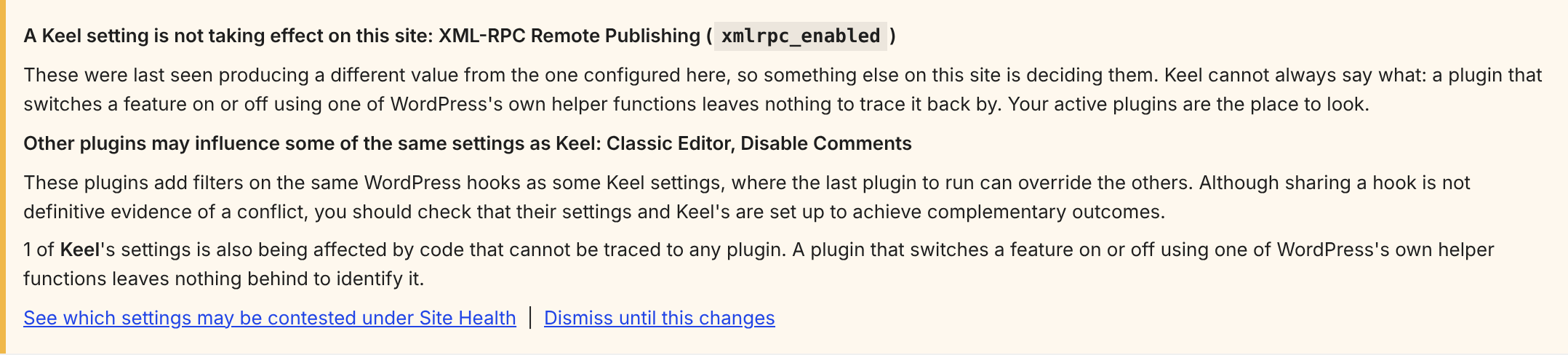
__return_false, so Keel reports the setting without naming a plugin.
How other plugins compare
I also tested how six of the most-installed security and comment plugins handle the same problems, including what their screens say when another plugin overrides them. That’s a separate post: Sucuri says XML-RPC is off. Pingbacks still get through.
What it can’t see
None of this proves which setting wins on a given request, and Keel says so on every screen.
- An overlap isn’t a conflict. Two plugins on
comments_openmay agree, or apply in different contexts. - The observer runs last, not quite always. It sits at the highest priority PHP allows. A callback that registered there first can still run after it.
- The update tables report what WordPress knows right now. They don’t promise when, or whether, an update will install. A host’s deployment process or an external cron can change the outcome without WordPress knowing.
- The ability inventory reads registrations, not results. Whether a callback grants a particular user a particular ability depends on that request, and finding out would mean running the code.
Quiet and visible
WordPress lets plugins cooperate without coordinating, and that’s a strength. The tradeoff is that plugins can also come into conflict with each other — and nothing tells you when one’s overriding another. It might be worthwhile for core to show admins (and report to AIs) more things like this — especially the update policy that’s actually in force on your site, where it came from, and what code is filtering it, or other key settings. For now, that’s what Keel does.
Part of this series
- Your WordPress site’s age decides whether it installs major updates — where core’s auto-update defaults come from, and how to read your site’s real policy.
- Is your old WordPress site still getting security updates? — how security fixes reach older sites, and what can prevent automatic installation.
- Keel Defaults — the plugin that makes core update settings visible and settable, and offers an eligible same-branch security update.
- Who actually gets WordPress security backports? — how many real sites took the backports, and how fast.
- You can’t observe a security backport by waiting for one — the test harness behind the update tables in posts 1 and 2.
- WordPress security backports: quiet by design — the 2013 decisions behind automatic backports and the missing manual patch option.
- What I’d do differently next time: studying WordPress patch uptake — what a follow-up study would change, and what the October totals can still support.
How this article was researched & written
The feature descriptions come from Keel’s code on the main branch as of October 27, 2026, which is the code that ships as Keel 0.9.0, and from pull requests #322, #328, #330 and #331. The screenshots come from local WordPress 7.1.3 labs running that code. The conflict screenshots use the same plugins and settings as the Playground demo: Classic Editor 1.7.0, Disable Comments 2.9.1 and Disable XML-RPC 1.0.1. The update diagnostics screenshot uses a lab site under version control, with a test plugin that filters automatic updates off. The history comes from Keel’s changelog. Claude helped draft this post from the code and changelog, built the labs and took the screenshots. The judgement calls, the framing, and the errors that remain are mine.
Last updated:
Leave a Reply